

I was opening a fresh Gemini session the other day, and I caught something most people swipe right past. Look at the welcome screen Google now shows you when you log in:
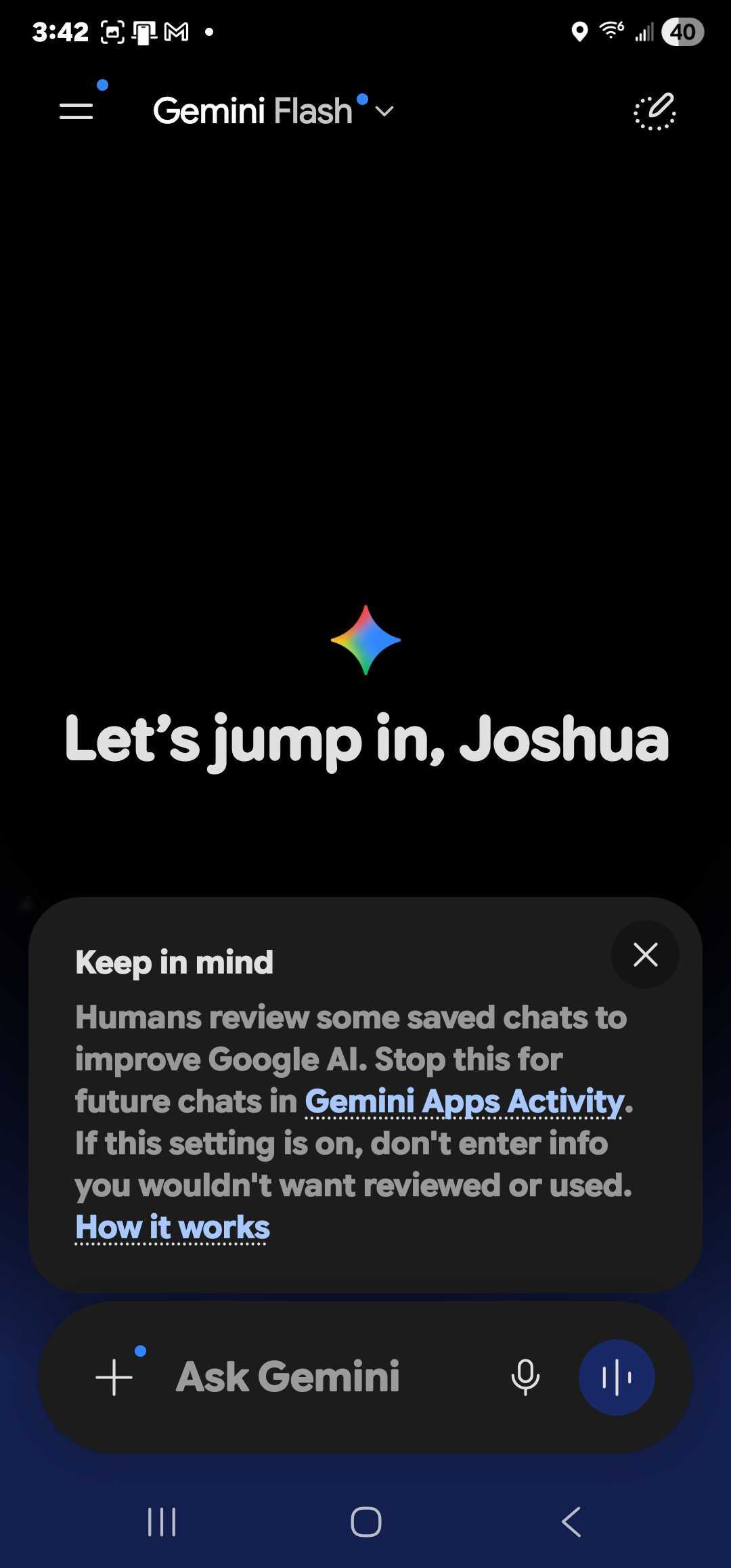
Right there, under a friendly “Hello, Joshua” greeting, Google quietly tells you: your chats can be reviewed by people. Not algorithms. People. With names and W-2s.
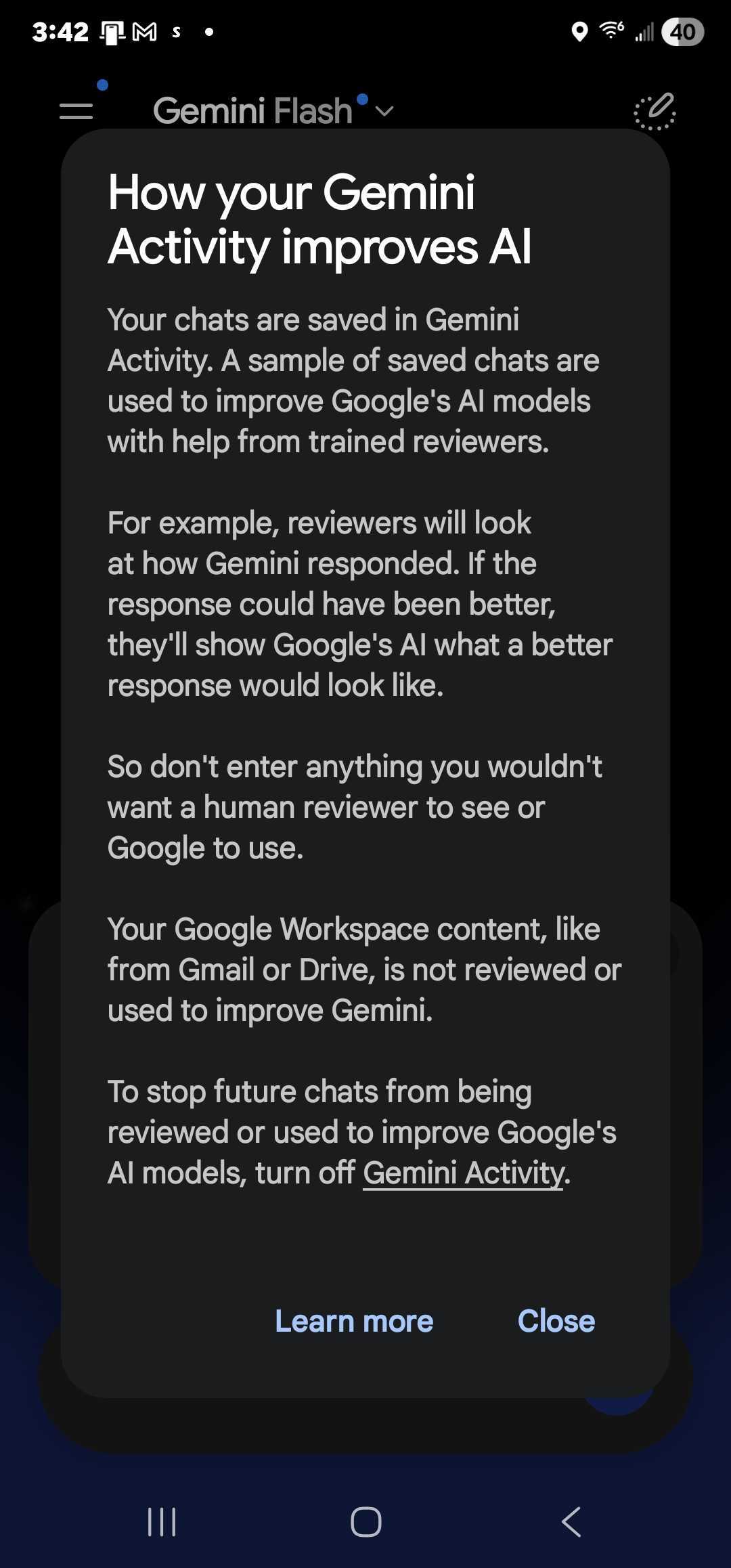
And it gets more specific if you click through. Here’s what the Activity panel actually says about what those reviewers are doing:
I’ve been in internet marketing for over 20 years. I’ve run ecommerce stores, built a SaaS that processed $20M+ a year in course sales, scaled dropshipping to $100K/day in ad spend. I’ve seen a lot of “we use your data to improve the product” notices. This is not new behavior. What’s new is that Google is finally saying it out loud, in plain English, on the front page of the app.
And here’s the part nobody is talking about: every major consumer AI tool does this by default. Google, OpenAI, Meta, Perplexity, Microsoft — all of them. There’s almost always a toggle to turn it off. Almost nobody finds it.
What “reviewed by people” actually means
Let me translate the corporate language. When Google says “trained reviewers read, annotate, and process” your conversations, what they mean is: contractors — real human beings — open your chat, read what you typed, label it, and feed it back into the next training run. Bloomberg reported back in 2023 that some of these reviewers were paid as little as $14/hour through staffing firms like Appen and Accenture, and that they described the work as “scared, stressed, underpaid.” They were rating the safety of medical questions without medical training. They were reading whatever you typed.
That hasn’t changed. The talent pool has gotten bigger, but the basic deal is the same: if you ask Gemini about a rash, a tax problem, a custody dispute, or a business idea you haven’t told anyone about — a stranger might read it.
And here’s the brutal kicker from Google’s own notice: even if you turn off Gemini Apps Activity going forward, anything that was already sampled for human review can be retained for up to three years. That’s not a typo. Three years. Disconnected from your account, but stored.
Why this is a default and not an opt-in
I want to be fair to the AI companies for a second. Human review is genuinely how these models get better at not lying, not generating dangerous content, and not embarrassing themselves. The Reinforcement Learning from Human Feedback (RLHF) loop is the difference between an AI that’s actually useful and one that hallucinates your home address.
But there’s a reason it’s on by default instead of being an opt-in checkbox at signup. If they asked nicely, most people would say no. So they don’t ask. They put a friendly notice at the top of the chat, link to a 4,000-word privacy hub, and trust that almost nobody will dig.
That’s the same playbook every consumer data company has run for 20 years. Facebook did it with the news feed. Google did it with location history. The AI labs are just running the same script with chat logs.
The opt-out paths for every major AI tool
Here’s the part to actually do. Open each of these in a tab and flip the toggle. It takes about ten minutes total.
1. Google Gemini
Go to myactivity.google.com/product/gemini and turn off “Gemini Apps Activity.” This stops new chats from being added to the training pool. Google’s full notice (the one I screenshotted above) lives at support.google.com/gemini/answer/13594961. Remember: this only protects future chats. Anything already sampled can be kept for up to three years.
2. OpenAI ChatGPT
Click your name in the bottom-left → Settings → Data Controls → turn OFF “Improve the model for everyone.” This is the consumer-facing toggle. If you’re on a Team or Enterprise plan, your data is already excluded by default. Verify it from OpenAI’s data-controls FAQ. Worth noting: turning this off does not delete past conversations from training data. It only stops the next one.
3. Anthropic Claude
As of August 2025, Anthropic flipped this from opt-out to opt-in for consumer Claude.ai accounts. If you said yes to the prompt that popped up, your chats can be retained for up to five years. If you said no (or skipped it), they keep your chats 30 days and don’t use them for training. Go to Settings → Privacy → “Help improve Claude” and confirm it’s OFF if you want the shorter retention.
4. Microsoft Copilot
Consumer Copilot (the free one at copilot.microsoft.com) does use chats for service-quality review and stores them up to 18 months. There’s no clean opt-out toggle — you have to manually delete conversations from the activity page. Microsoft 365 Copilot (the paid business version) is a different product and excludes chats from training. The privacy doc is at learn.microsoft.com. If you’re using Copilot for anything sensitive, use the paid version or a different tool.
5. Meta AI (Instagram, WhatsApp, Messenger)
This is the worst of the bunch. Meta uses your AI conversations for training by default, and US users have no formal opt-out. EU and UK users can submit a “Right to Object” form through Meta’s privacy policy. MIT Technology Review walked through the process here. Until US privacy law catches up, the practical advice is: don’t type anything into Meta AI you wouldn’t post publicly.
6. Perplexity
Settings → Account → Preferences → turn OFF “AI Data Retention.” This stops future queries from being used for training. Like the others, it doesn’t reach back and delete what’s already been used.
What I actually do
I’m not paranoid about this. I use Gemini, ChatGPT, and Claude every day to draft, summarize, and brainstorm. I’m fine with the trade-off most of the time — better tools, in exchange for some sampled training data.
Where I draw the line is anything that’s genuinely confidential. Client revenue numbers I haven’t been authorized to share. Health stuff. Legal questions. Personal financial details. Anything where I’d be embarrassed if a contractor in a third-party labeling shop opened the chat and read it.
For that work, I do three things, and I’d suggest the same for any business owner reading this:
- Turn off the training toggle on every consumer AI tool you use. It takes ten minutes total. Just do it.
- Use the paid/business tier for anything sensitive. ChatGPT Team, Microsoft 365 Copilot, Claude for Work, and the Gemini equivalent inside Google Workspace all exclude your data from training by default. You’re paying for the privacy guarantee.
- Strip identifying details before you paste. If I’m asking an AI to help me draft a difficult email to a specific client, the version I paste in says “the client” not the actual name. It’s a small habit. It matters.
The bigger point for business owners
If you run a business that touches customer data — and most of the businesses I work with do — this conversation about AI privacy isn’t just personal. It’s a compliance issue waiting to happen. The minute one of your team members pastes a customer list, a contract, or a billing record into a consumer AI tool without thinking, you’ve potentially handed that data to a downstream training pipeline you don’t control.
I’d rather see businesses standardize on the paid business tiers specifically because those tiers come with a “we don’t train on your data” contract you can point to in an audit. That’s a $20/seat/month decision that prevents a $200,000 problem.
The lesson from those Gemini screenshots isn’t “Google is evil.” Google is being unusually transparent — they put the notice on the front page. The lesson is that every major AI tool is doing the same thing, and the responsibility for protecting your data has been quietly pushed onto you. Flip the toggles. Use the paid tiers for anything sensitive. And maybe glance at the welcome screen the next time you open one of these tools. Read the small print. It’s there for a reason.
FAQ
Do AI companies actually have humans reading my chats?
Yes. Google, OpenAI, Meta, Microsoft, and Perplexity all use trained reviewers to read samples of user conversations. The contractors are usually third-party staffing firms. This is documented in each company’s own privacy notice.
If I turn off training, are my old chats deleted?
No. Turning off the toggle stops future chats from being added to the training pool. Anything already sampled can be retained according to the company’s stated retention window — three years for Google Gemini, five years for opted-in Anthropic users, 18 months for Microsoft Copilot consumer.
Is the paid business tier actually different?
Yes, materially. ChatGPT Team/Enterprise, Microsoft 365 Copilot, Claude for Work, and Gemini inside Google Workspace exclude your data from training by contract. If you’re using AI for any work that touches customer data, the paid tier is the only defensible choice.
What about local AI models?
If you really want zero data leaving your machine, run a local model with Ollama or LM Studio. The quality gap with frontier models is real but narrowing every quarter. For most business use cases, the paid-tier route is more practical.
The bottom line
Google didn’t break anything by showing you that “Keep in mind” notice. They just stopped hiding the ball. Every major AI tool has been doing some version of this for years. The toggle to turn it off has been there the whole time — buried, but there.
Spend ten minutes flipping the toggles. Move sensitive work to a paid tier. And the next time an AI tool greets you with a friendly “Hello, [your name],” read the small print right under it. That’s where the actual deal is written.
If you want help thinking through which AI tools are safe to roll out across your team and how to set up the right data controls, that’s part of what we help with at Automated Sales Machine. Book a demo and we’ll walk through your setup.