


The marketing automation software market is projected to grow at an 18.58% compound annual growth rate through 2028. That number, pulled from MarTech Cube’s market research, tells a clear story: businesses are adopting automation at a pace that is rewriting how sales and marketing teams operate. What it does not tell you is which platform is actually worth the money.
This guide cuts through the listicle noise. Most comparison posts simply repackage vendor marketing copy. This one examines what the leading platforms actually do, where each breaks down, and how to match a tool to real operational needs — whether you are a solo operator spending $50 a month or an enterprise team budgeting six figures annually.
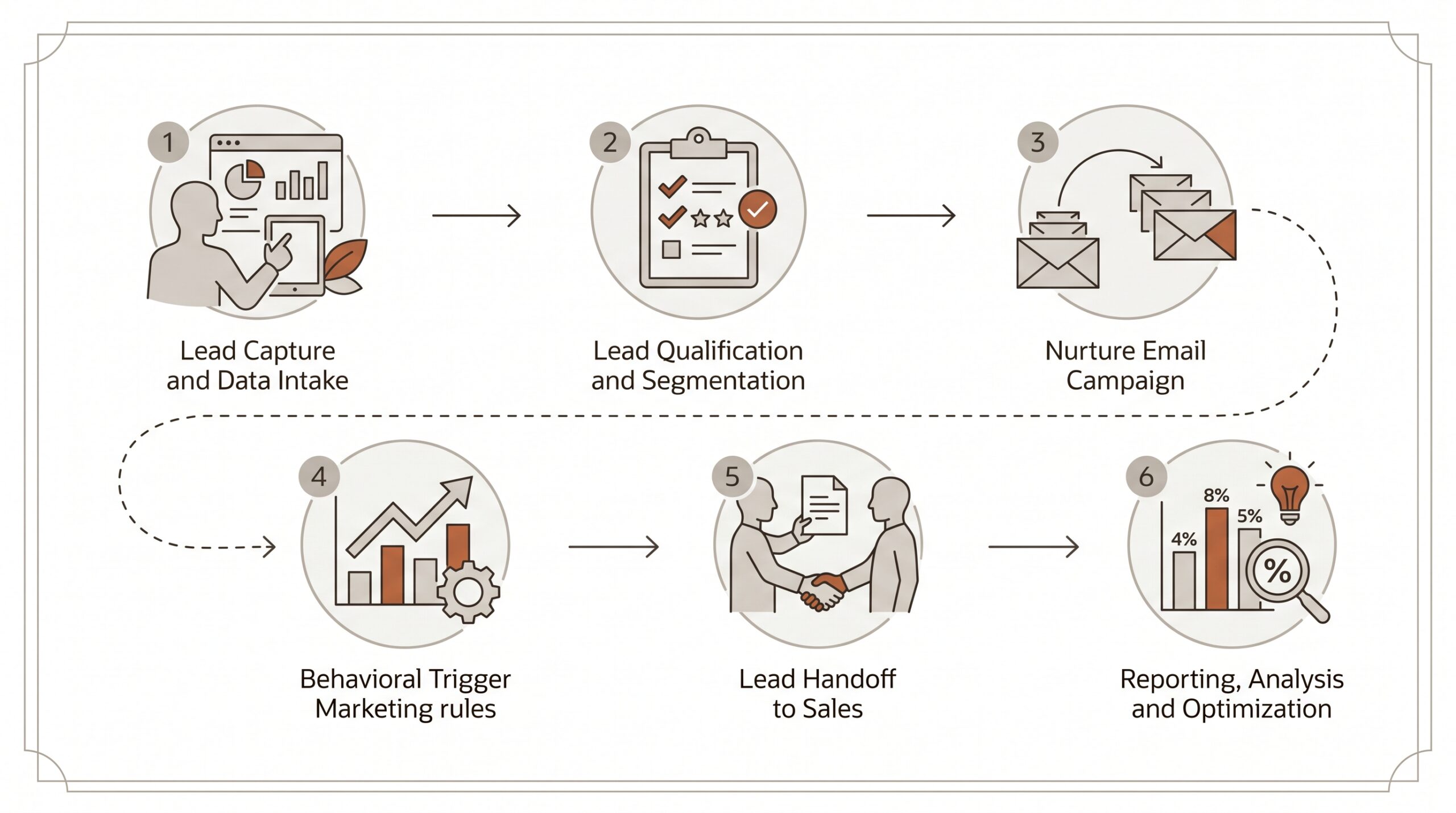
What Is Marketing Automation Software?
Marketing automation software is a category of technology that replaces manual, repetitive marketing tasks with rule-based or AI-driven workflows. The software monitors contact behavior, triggers pre-built sequences, routes leads to the right team members, and records every interaction — without requiring a human to initiate each step.
The practical definition from IBM’s technology division frames it well: marketing automation is the use of software and technology to manage routine marketing processes across multiple channels. The operative word is “routine.” Automation handles the repeatable. Marketers handle the strategic.
In concrete terms, a marketing automation platform typically handles some combination of the following:
- Email marketing automation: Sending sequences triggered by user behavior — a welcome series after signup, a re-engagement campaign after 60 days of inactivity, an abandoned cart reminder after a form partial-completion.
- Lead nurturing: Moving contacts through a defined progression from cold awareness to purchase-ready, with content and touchpoints matched to each stage.
- Drip campaigns: Time-sequenced or behavior-sequenced message series that educate, qualify, and convert subscribers over days or weeks.
- Customer segmentation: Sorting contacts into groups based on demographics, behavior, purchase history, or engagement scores, then targeting each group with relevant content.
- Workflow automation: Visual or logic-based rule chains that connect triggers (“contact fills out form”) to actions (“add to CRM, assign to rep, send confirmation email”).
- Campaign management: Planning, scheduling, executing, and measuring multi-channel campaigns from a single dashboard.
- Marketing analytics: Reporting on open rates, conversion rates, revenue attribution, and pipeline influence to prove — or disprove — what is working.
Marketing automation is not magic. A platform does not generate good content, understand your customer’s psychology, or fix a broken offer. What it does is eliminate the operational drag that prevents well-designed marketing programs from running consistently at scale.
Ad Age research found that 98% of small-business buyers entering the marketing automation category were doing so for the first time — meaning most buyers have no benchmark for what “good” looks like. The top pain point reported was lead management, cited by 27% of respondents. Contact management (74%), email capability (55%), and lead tracking (43%) were the features buyers most urgently wanted.
That research shapes a useful lens for evaluation: what businesses actually need from marketing automation is often simpler than vendors would have them believe.
Key Features to Look For
Every marketing automation platform claims to do everything. The reality is that platforms are built around different architectural assumptions, and those assumptions determine what is native versus bolted on. Here is what to actually evaluate.
Contact Management and CRM Integration
A marketing automation tool is only as effective as the contact data feeding it. The platform needs either a built-in CRM or a deep, reliable CRM integration. Without clean, unified contact records, segmentation is flawed and personalization is guesswork.
Look for: custom fields, merge/dedup tools, contact scoring, activity history, and seamless two-way sync if connecting to an external CRM. Platforms that treat CRM integration as an afterthought create data silos that erode trust in the entire system over time.
Visual Workflow Builder
Workflow automation is the engine of modern marketing automation. The best platforms offer a drag-and-drop canvas where you can map out if/then logic, time delays, conditional splits, and multi-channel touchpoints. The quality of this builder determines how quickly non-technical marketers can build and modify campaigns without relying on a developer.
Red flag: platforms that require code or complex configuration for basic sequences. If setting up a five-email onboarding series takes four hours, the tool is already costing more than it saves.
Email and Multi-Channel Capability
Email marketing automation remains the highest-ROI channel in most marketing stacks. But email alone is rarely sufficient. The best platforms extend automation to SMS, push notifications, social media scheduling, and even direct mail or ad audience sync.
Evaluate deliverability reputation, template editors, A/B testing depth, and unsubscribe/compliance handling. A beautiful template that lands in spam is worthless.
Lead Scoring and Segmentation
Lead scoring assigns numerical values to contacts based on their behavior and demographic fit. A contact who has opened four emails, visited the pricing page twice, and filled out a quote form should surface differently in your CRM than a contact who signed up for a newsletter six months ago and never clicked anything.
Robust customer segmentation goes beyond basic list filtering. Look for dynamic segments that update in real time, behavioral triggers, purchase history segmentation, and the ability to combine multiple conditions with AND/OR logic.
Analytics and Attribution
Marketing analytics capability separates platforms that help you learn from platforms that simply execute. At minimum, a platform should report on email performance (opens, clicks, conversions), workflow performance (contact progression, drop-off points), and revenue attribution (which campaigns influenced closed deals).
Advanced platforms offer multi-touch attribution models, A/B test significance reporting, and real-time dashboards. For teams with a revenue accountability mandate, attribution is not optional — it is how marketing justifies its budget.
Integrations
No platform operates in isolation. The depth and reliability of a platform’s integration ecosystem determines whether it amplifies your existing stack or forces you to rebuild it. Evaluate native integrations versus Zapier workarounds. A native integration maintains data integrity; a Zapier middle-layer introduces latency and failure points.
Key integrations to verify: your CRM (if external), e-commerce platform, advertising platforms (Google, Meta), scheduling tools, and customer support software.
AI and Predictive Capabilities
The 2026 competitive landscape has shifted AI from a differentiator to a baseline expectation. Platforms now offer AI-driven send time optimization, subject line testing, predictive lead scoring, and conversational AI bots for lead qualification. The best implementations embed AI into workflows transparently; the worst bolt on a “powered by AI” badge to existing rule-based features.

Best Marketing Automation Software Options
The following platforms represent the current field across different use cases, price points, and architectural philosophies. Each assessment includes both strengths and genuine limitations — because no platform is right for every situation.
HubSpot — Best for Integrated Inbound Marketing
HubSpot holds over 13,700 reviews on G2, making it the most-reviewed platform in the category. That volume of feedback reflects genuine market penetration, not just marketing spend. The platform’s core strength is its integrated suite: CRM, content management, email marketing automation, ad management, and service tools live in one ecosystem with a shared data layer.
Strengths:
- The free CRM tier is genuinely capable for small teams getting started
- The workflow builder is intuitive enough for non-technical marketers
- Content, social, ads, email, and CRM data share a single contact record
- Reporting and attribution are best-in-class at the enterprise tier
Limitations:
- Pricing escalates sharply. Moving from Starter to Professional unlocks the automation features most buyers actually want, but the jump from $20/month to $890/month is not a linear cost increase
- Contact-based pricing penalizes businesses with large lists and lower send frequency
- The platform’s breadth creates genuine complexity — many teams use 20% of what they pay for
- Onboarding costs are frequently cited in negative reviews as a hidden expense
Best for: Mid-market B2B companies with a dedicated marketing team, inbound content strategy, and budget for a full-suite platform.
ActiveCampaign — Best for Email Automation Depth
ActiveCampaign built its reputation on the depth of its email marketing automation and workflow capabilities. The visual automation builder is widely regarded as among the most powerful available, supporting complex conditional logic, multi-branch sequences, and sophisticated lead nurturing without requiring technical expertise.
Strengths:
- Automation builder is genuinely best-in-class for complexity and usability balance
- Lead scoring and CRM features are strong for the price tier
- Deliverability has consistently ranked among the top performers in third-party audits
- Pricing is competitive for teams prioritizing automation over full-suite breadth
Limitations:
- The interface feels dated compared to newer entrants; the learning curve is real
- Reporting lacks the depth of HubSpot at comparable tiers
- E-commerce and social features are secondary to email-first workflows
- Integration with external CRMs can require workarounds that reduce reliability
Best for: B2B and B2C teams where email automation is the primary use case and workflow sophistication matters more than visual design or analytics depth.
For a broader comparison of email-focused tools, the 2026 email marketing platform comparison examines deliverability and pricing across eight providers.
Klaviyo — Best for E-Commerce Brands
Klaviyo has positioned itself as the dominant marketing automation platform for direct-to-consumer and e-commerce brands. Its deep integrations with Shopify, WooCommerce, and BigCommerce allow it to pull purchase data, browse behavior, and customer lifetime value into segmentation and automation logic in ways that generic platforms cannot replicate without custom development.
Strengths:
- E-commerce data integration is native and deep — not an add-on
- Predictive analytics for customer lifetime value and churn risk are genuinely useful
- SMS and email automation within a single platform with unified reporting
- Over 350 integrations with e-commerce tools and platforms
Limitations:
- Minimal value for businesses outside of e-commerce — the platform’s strengths are tightly coupled to transactional data
- Pricing scales with contact count and can become expensive for large lists with lower purchase frequency
- Limited CRM functionality beyond basic contact management
- Not appropriate for B2B lead nurturing or service-based business models
Best for: E-commerce brands, DTC companies, and retailers with Shopify or WooCommerce stores where purchase behavior should drive automation logic.
Mailchimp — Familiar but Outgrown Quickly
Mailchimp is the entry point through which millions of businesses have discovered email marketing. Its brand recognition is enormous; its platform has improved significantly from its roots as a simple newsletter tool. The current version includes basic workflow automation, landing pages, a website builder, and a CRM layer.
Strengths:
- Free tier allows up to 500 contacts with basic automation — genuinely useful for early-stage businesses
- Template library and design tools are approachable for non-designers
- Wide integration ecosystem given its market position
- Predictable, transparent pricing at lower tiers
Limitations:
- Automation depth is limited compared to ActiveCampaign or HubSpot at comparable price points
- CRM functionality is basic; not suitable for complex sales pipelines or lead scoring
- Multi-channel capability (SMS, push, social) lags competitors
- Deliverability has been a recurring complaint in independent audits
- Customer support quality at lower tiers is frequently cited as a weakness
Best for: Early-stage businesses doing their first email campaigns who need a zero-cost or low-cost starting point before outgrowing to a more capable platform.
Teams considering a move off Mailchimp can review the detailed breakdown at best Mailchimp alternatives for 2026.
Automated Sales Machine (ASM) — Best All-in-One for Growing Businesses
Most marketing automation tools solve one problem well and leave gaps everywhere else. HubSpot gives you great inbound tools but bills you separately for each module that unlocks as you grow. ActiveCampaign gives you powerful email automation but hands you a basic CRM that does not track deals well. Klaviyo works beautifully for e-commerce but leaves service businesses and B2B teams underserved.
Automated Sales Machine is built on a different architectural premise: all the tools a growing business needs to attract, convert, and retain customers should live in a single platform under a single subscription, without forcing stack decisions at every budget inflection point.
ASM consolidates:
- CRM and pipeline management — full contact management, deal pipelines, and task automation in one place. No separate CRM subscription required.
- Workflow automation — visual automation builder covering email, SMS, internal notifications, pipeline stage changes, and contact field updates within a single canvas.
- Email and SMS marketing — broadcast campaigns and drip campaigns across both channels, with unified contact records so a reply to an SMS updates the same profile as a clicked email.
- Funnel and landing page builder — drag-and-drop funnel creation with forms, checkout pages, and order bumps, without a separate ClickFunnels or Leadpages subscription.
- Calendar and appointment booking — native scheduling with automated confirmation and reminder sequences replacing Calendly for most users.
- Reputation management — automated review request sequences that trigger post-purchase or post-service, with monitoring for new reviews across Google and Facebook.
- Social media planner — scheduled posting across major platforms with a content calendar, reducing the need for a standalone tool like Buffer or Hootsuite.
- Memberships and online courses — host and sell digital products, courses, and membership communities without a separate platform like Kajabi or Teachable.
- AI conversation bots — deploy AI-powered chat across website and SMS to qualify leads 24/7, book appointments, and answer FAQs before a human rep is involved.
The business case for consolidation is straightforward. A growing business paying separately for a CRM, an email platform, a funnel builder, a scheduling tool, a reputation tool, and a social scheduler is typically spending $400–$800 per month across disconnected tools. ASM replaces that stack under a single platform, which eliminates the integration overhead, data inconsistency, and per-seat multiplication that makes fragmented stacks expensive to maintain.
See the full feature breakdown at automatedsalesmachine.com/features and pricing at automatedsalesmachine.com/pricing.
For context on how all-in-one platforms compare to point solutions, the all-in-one marketing platform guide walks through the consolidation math in detail.
Limitations worth acknowledging:
- The breadth means some individual modules will not match the depth of a category specialist — if email deliverability analytics is your sole metric, ActiveCampaign may offer more granular reporting at that layer
- Teams deeply embedded in a specific CRM like Salesforce or HubSpot may face migration overhead
- The platform is optimized for service businesses, local businesses, coaches, agencies, and growing SMBs — large enterprise teams with highly customized Salesforce environments may find it less suitable
Best for: Service businesses, coaches, consultants, local businesses, and SMBs that want one platform to run their entire marketing and sales operation without stitching together five separate subscriptions.
Start a free trial of Automated Sales Machine and see what the consolidated stack looks like in practice.

Marketing Automation by Business Size
The right marketing automation platform for a 10-person service business is almost never the same as the right platform for a 500-person SaaS company. Business size shapes the needs, the technical resources available, the complexity of the sales process, and the budget available — all of which should drive platform selection.
Marketing Automation for Small Business (1–25 employees)
Small business buyers face a specific set of constraints that most enterprise-focused platform comparisons ignore. According to Ad Age research, the vast majority of small businesses entering the marketing automation category are doing so for the first time, without a dedicated marketing operations role, and with a budget that makes per-seat pricing or tiered module costs genuinely painful.
The priorities for marketing automation for small business typically look like this:
- Setup speed matters more than configurability. A solo operator or small team cannot spend three weeks in implementation. The platform needs to be usable within days.
- All-in-one beats best-of-breed. Managing five integrations between five tools is a part-time job at the small business level. A single platform that handles CRM, email, and basic automation is almost always preferable to a more powerful but fragmented stack.
- Pricing predictability. Variable pricing based on contact count or email sends creates budget unpredictability. Small businesses benefit from flat-rate or simple tier pricing.
- Support quality. Without internal technical expertise, responsive support is infrastructure, not a luxury.
For small businesses, Mailchimp’s free tier is a viable starting point for pure email. ASM offers the most comprehensive starting package for teams that need CRM + automation + funnels from day one without the per-module pricing of HubSpot. ActiveCampaign’s Lite tier offers strong automation depth at a competitive price for email-first needs.
Related reading: how to get more leads for small business in 2026 covers the upstream lead generation side of the automation equation.
Mid-Market (25–200 employees)
Mid-market teams have more resources than small businesses but face complexity challenges that pure SMB tools cannot handle. A 50-person company with a dedicated marketing manager and a sales team of ten needs lead scoring, CRM integration that the sales team will actually use, multi-channel campaign management, and reporting that connects marketing activity to pipeline and revenue.
At this tier, HubSpot’s Professional tier starts to make economic sense if the team is investing in content marketing and inbound. ActiveCampaign CX handles sophisticated multi-channel automation well. ASM handles this tier with particular strength for service businesses, agencies, and companies with a consultative sales process — the combined CRM, automation, calendar, and AI bot capability maps directly to how these businesses actually sell.
The hidden cost at the mid-market level is integration maintenance. A marketing stack that requires a part-time operations person to maintain integrations between five platforms is more expensive than it appears on vendor pricing pages. Platform consolidation becomes increasingly valuable as team size grows and the cost of data inconsistency compounds.
Enterprise (200+ employees)
Enterprise marketing automation requirements diverge significantly from SMB needs. At scale, the priorities shift toward data governance, user permissions and role-based access, custom API integration with internal systems, advanced attribution modeling, and compliance capabilities (GDPR, CCPA, SOC 2).
HubSpot Enterprise and Salesforce Marketing Cloud are the dominant options at this tier. Both carry enterprise pricing to match — HubSpot Enterprise starts at $3,600/month, and Salesforce Marketing Cloud pricing is custom and commonly reaches five or six figures annually.
Enterprise buyers should evaluate total cost of ownership, not just licensing fees. Implementation, customization, training, and ongoing management costs often exceed the software cost in the first year. Forbes’ analysis of enterprise marketing automation noted that feature lists between enterprise platforms have converged — the real differentiator is how well the platform integrates with existing infrastructure, and how responsive the vendor is when problems arise post-implementation.
How to Choose the Right Marketing Automation Tool
With dozens of platforms competing for the same search terms, platform selection frameworks matter more than platform features lists. Here is a practical decision process.
Step 1: Define the Core Problem You Are Solving
Marketing automation platforms are sold as solutions to every marketing problem simultaneously. That framing is commercially convenient and practically misleading. Before evaluating a single platform, answer these questions:
- Is the primary gap in lead generation, lead nurturing, or lead conversion?
- Is the sales process mostly self-serve (e-commerce) or sales-assisted (service/B2B)?
- Is email the primary channel, or does multi-channel (SMS, social, ads) matter immediately?
- Does the team need a CRM, or does one already exist and work well?
- What does “success” look like in 90 days — and can the platform actually measure it?
Teams that skip this step end up purchasing platforms against a competitor’s feature matrix rather than their own operational reality. They then discover that the feature they paid for is not the feature they actually needed.
Step 2: Audit Your Existing Stack and Integration Requirements
Before purchasing any marketing automation tool, map what you already have: CRM, e-commerce platform, ad accounts, scheduling tools, and customer support software. Determine which of these are genuinely entrenched (sales team depends on them daily) and which could be replaced.
This audit often reveals that the real problem is not finding a better individual tool — it is replacing multiple tools with one coherent platform. The consolidation calculation is simple: add up monthly spend on disconnected tools, then add an estimate for the integration management time. That total is the real cost of the current stack, and the relevant benchmark for evaluating a platform like ASM that covers multiple functions.
For teams assessing their pipeline management needs specifically, this guide to sales pipelines for small business provides a useful framework for thinking about CRM and automation integration.
Step 3: Score Platforms Against Your Non-Negotiables
Every buying process should have a short list of hard requirements — the criteria that disqualify a platform regardless of its other merits. Common non-negotiables include:
- Budget ceiling (eliminate platforms that exceed it, even at entry tier)
- Specific integration requirements (if Shopify integration is required, platforms without it are out)
- Compliance requirements (HIPAA, GDPR, or industry-specific data requirements)
- Team technical capability (if no developer is available, platforms requiring API setup are impractical)
- Implementation timeline (if the team needs to be operational in two weeks, enterprise platforms with six-week onboarding cycles are disqualifying)
After eliminating platforms that fail non-negotiables, evaluate the remainder on the quality of their core competency for your use case — not on the length of their feature list.
Step 4: Run a Structured Trial
Most platforms offer free trials or freemium tiers. Use them with a defined test, not just exploratory browsing. Set up one real use case — an onboarding sequence, a lead nurturing workflow, or a simple CRM pipeline — and measure how long it takes, how many support interactions are required, and whether the output performs as expected.
Trials reveal what documentation and demos conceal: interface friction, support responsiveness, and the gap between a platform’s claimed capability and its actual usability at your skill level.
Step 5: Calculate Total Cost of Ownership
Platform pricing pages show starting prices. Total cost of ownership includes the starting price, the likely growth path as the business scales (contact count increases, feature tier upgrades), implementation costs, training costs, and the ongoing cost of managing integrations between tools.
A platform priced at $49/month that requires a $500 one-time setup, a $200/month email service add-on, and two hours per week of integration maintenance is materially more expensive than a platform priced at $197/month that includes everything. Run the math for 12 months, not just month one.
For an overview of how to evaluate email-specific tools as a component of a broader stack, the 2026 email marketing software guide covers pricing models and deliverability benchmarks in detail.
FAQs
What is the best marketing automation software?
There is no single best marketing automation software — the right answer depends on business size, sales model, and existing technology stack. For e-commerce brands, Klaviyo leads on purchase-behavior automation. For B2B inbound marketing with a dedicated team, HubSpot Professional offers the most complete integrated suite. For email automation depth on a tighter budget, ActiveCampaign is the most capable option at its price tier. For growing service businesses, small and mid-size businesses seeking a unified growth engine to replace a fragmented stack of CRM, email, funnel builder, and scheduling tools, Automated Sales Machine offers the most comprehensive consolidated package.
The honest answer to “best” is: best for whom, doing what, at what budget. Start with the problem, not the platform ranking.
Is HubSpot a marketing automation tool?
Yes — HubSpot is a marketing automation platform, though it is more accurately described as a full marketing, sales, and service suite. The marketing automation capabilities (email workflows, lead scoring, behavioral triggers, campaign management) are available within HubSpot’s Marketing Hub, which starts at the Starter tier but unlocks meaningful automation only at the Professional tier ($890/month for up to 2,000 contacts).
HubSpot is the market leader by review volume, with over 13,700 G2 reviews. Its strength is integration depth across its own suite — marketing, CRM, sales, and service sharing a unified data layer. Its weakness is pricing: the platform is genuinely expensive for SMBs once the features that justify the investment become available.
What is the best free marketing automation tool?
The most capable free marketing automation tools available in 2026 are HubSpot Free (up to 1,000 contacts, limited automation) and Mailchimp Free (up to 500 contacts, basic one-step automations). Both are legitimately functional starting points for early-stage businesses with small lists and simple automation needs.
The important caveat on free tools: the features that make marketing automation genuinely valuable — multi-step workflows, lead scoring, behavioral segmentation, A/B testing, advanced reporting — are almost universally locked behind paid tiers. Free tools are entry points, not permanent solutions. Businesses should evaluate free tiers as trial periods, not long-term platforms, and choose based on the paid tier roadmap, not the free tier features alone.
What is CRM vs marketing automation?
CRM (Customer Relationship Management) and marketing automation are related but distinct categories that are increasingly converging in modern platforms.
A CRM is fundamentally a database and activity tracker: it stores contact records, logs interactions, tracks deal stages, and surfaces information for sales and service teams. CRM is primarily a tool for managing existing relationships and opportunities in a structured sales process.
Marketing automation is a workflow execution layer: it defines rules for how contacts are messaged, segmented, scored, and routed based on their behavior and characteristics. Marketing automation is primarily a tool for generating and progressing relationships at scale before and alongside a human sales interaction.
The practical distinction: a CRM without marketing automation tells you that a contact visited your pricing page three times. Marketing automation connected to that CRM automatically sends that contact a targeted case study email, assigns a lead score update, and creates a task for the rep to follow up — all without manual intervention.
Many platforms now combine both functions. HubSpot, ASM, and ActiveCampaign all include CRM functionality alongside their automation capabilities. Pure-play CRMs like Salesforce are commonly integrated with marketing automation tools like Pardot or third-party platforms. For SMBs, choosing marketing automation software that handles both CRM integration and marketing automation natively is usually more practical than managing two separate systems.
The Bottom Line
The marketing automation software landscape has more options than any team needs to evaluate. The category has matured to the point where the core features — email automation, workflow builders, lead scoring, basic segmentation — are commoditized. What differentiates platforms in 2026 is the quality of their integrations, the usability of their interfaces, their pricing structure as a business scales, and whether their architectural assumptions match the way a specific business actually operates.
For e-commerce brands, Klaviyo remains the category standard. For B2B inbound teams with budget, HubSpot is the safe enterprise choice. For budget-conscious buyers prioritizing email automation depth, ActiveCampaign punches above its price point. For growing businesses that want a single platform to replace their fragmented stack of CRM, email tools, funnels, scheduling, and reputation management, Automated Sales Machine offers a consolidation argument that the point-solution vendors cannot match on a comparable total cost basis.
The decision framework matters more than the product review: define your problem, audit your stack, apply hard filters, and trial with a real use case. Platforms that look identical on a feature comparison table can feel dramatically different when a non-technical marketer sits down to build their first automation.
If the consolidated platform model fits your operation, explore Automated Sales Machine with a free trial and run the five-day setup challenge: CRM configured, first automation live, first funnel published. That trial will tell you more than any comparison article — including this one.