

CtrlOps — Deploy, Debug & Manage Linux Servers with AI.
237 upvotes · #5 Product of the Day · Launched May 19, 2026 — View on Product Hunt
A ctrlops review reveals why CtrlOps is changing how small ops teams manage Linux servers. Instead of wrestling with spreadsheets of IPs and half-remembered commands, you get an AI terminal that generates commands you approve before running them. No DevOps degree required. Deploy from GitHub in minutes, monitor servers visually, and manage infrastructure without clunky agents eating server resources. For teams tired of manual server ops, this is AI-assisted infrastructure done right.
Topics: Linux, Developer Tools, Artificial Intelligence
What CtrlOps Does
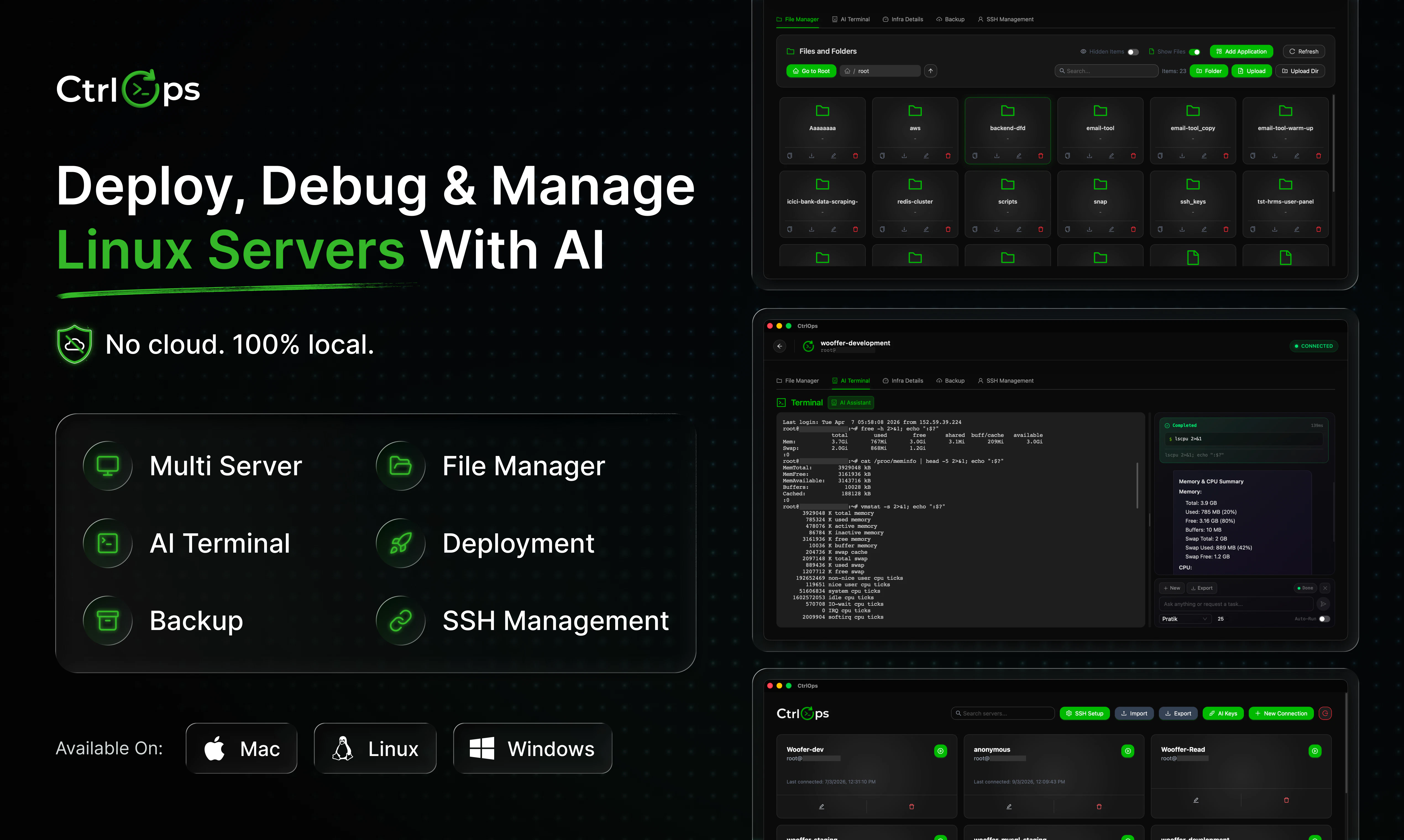
CtrlOps is an AI-powered terminal for Linux server management. You describe what you want to do in plain language—”deploy my Node app from this GitHub repo” or “check why CPU is spiking”—and the AI generates shell commands for your approval. Instead of hunting through documentation or guessing syntax, the AI understands your intent, proposes commands, and you click to execute. All credentials stay local; nothing touches external servers. Works on Mac, Windows, and Linux.
The platform handles deployment, debugging, and ongoing server management through a unified interface. Deploy one-click deploys from any GitHub repository. Access a growing library of pre-written scripts for common tasks. Monitor real-time server stats without installing agents. Manage files visually instead of wrestling with SCP. For small teams and solo dev-ops, it collapses hours of manual work into minutes while keeping security tight.


CtrlOps Key Features
CtrlOps combines AI command generation with practical server tooling:
- AI Terminal — Describe tasks in English; get shell commands with approval-before-execution to prevent accidents.
- One-Click Deployments — Link your GitHub repo and deploy with a single action; no SSH keys juggling or manual git pulls.
- Scripts Library — Pre-built scripts for common operations (backups, updates, monitoring) plus community contributions.
- Visual File Manager — Browse, edit, and upload files without touching the command line or remembering SFTP paths.
- Real-Time Monitoring — CPU, memory, disk, and process stats displayed live; no agent bloat on your server.
Who Should Use CtrlOps
CtrlOps fits small SaaS teams self-hosting infrastructure. You rent a few VPS instances but lack a dedicated DevOps engineer. Deploying updates or debugging server issues means someone jumping on SSH, memorizing commands, and hoping nothing breaks. CtrlOps removes that friction. Deploy your app, diagnose problems, and scale infrastructure without the expertise tax.
Solo dev-ops and technical founders benefit most. You handle everything—code, database, server—and time is your scarcest resource. Agencies managing client VPS instances also win; faster deployments mean faster ticket resolution and happier clients. Even teams using Kubernetes for production often still manage simpler infrastructure (staging, monitoring, logging servers) the old way. CtrlOps makes that simple infrastructure actually simple.
CtrlOps Pricing and Plans
Pricing details are not yet publicly posted on the CtrlOps website. Check the CtrlOps Product Hunt page or their official site for current plans and free-tier limits. Early adopters often find special pricing, so sign up early if the feature set fits your needs.
CtrlOps vs Alternatives
Ansible automates repetitive server tasks but requires learning YAML syntax and playbook structure. Terraform is infrastructure-as-code for multi-cloud deployments—overkill for small teams managing a handful of VPS. RunCloud and ServerAvatar offer dashboards and one-click deploys but rely on UI workflows; you’re still constrained by pre-built options. CtrlOps differs by making the AI terminal the primary tool. You describe what you want, AI generates the exact commands or scripts, and you approve before execution. It’s the first tool that feels like having a senior DevOps engineer on Slack, available 24/7, ready to generate and execute infrastructure commands at your pace.
Pros and Cons
Pros:
- Radically faster deployments — 60-minute manual processes compress to 5 minutes.
- No agent overhead — Monitoring and management happen without background processes draining server resources.
- Approval before execution — AI generates commands, but you decide whether to run them; safety built in.
- Steep learning curve eliminated — No need to master SSH, bash scripting, or DevOps tools; just describe your intent.
Cons:
- AI hallucinations on edge cases — Complex or non-standard server setups may confuse the AI; fallback to manual commands required.
- Credential security depends on you — Local storage is safer than cloud, but USB theft or device compromise exposes everything.
- Limited to Linux servers — Windows Server shops are out of scope; tool is purpose-built for Linux-first teams.
The CtrlOps Review Verdict
This ctrlops review concludes that it’s a genuinely useful tool for the teams it targets. If you self-host a few VPS instances and want to stop memorizing deployment steps, CtrlOps accelerates your workflow without adding complexity. The AI-first approach is novel and actually works for routine tasks. The approval gate prevents disasters. The lack of server agents keeps your infrastructure lightweight.
Downsides are real: AI can misfire on unusual setups, and you’re trusting the tool with credentials. Neither is a dealbreaker if you understand the tradeoff. For small SaaS teams, solopreneurs, and agencies managing client infrastructure, it’s worth a pilot. You might find it saves enough time to justify the cost—and frees your brain for actual product work instead of remembering where to SSH and what to deploy.
FAQ About CtrlOps
Does CtrlOps require agents on my servers?
No. CtrlOps connects directly via SSH and executes commands or deploys code without installing background agents. Your servers stay clean and lightweight.
Are my credentials stored in the cloud?
No. All credentials stay on your local machine (Mac, Windows, Linux). CtrlOps doesn’t phone home with your SSH keys, API tokens, or database passwords. Everything is 100% local.
Can CtrlOps deploy apps from private GitHub repos?
Yes, as long as you provide a deploy key or SSH access token. CtrlOps handles the GitHub auth and pulls your code directly to the server during one-click deployment.
Related Reading
Interested in AI-assisted workflows? Check out our reviews of PollyReach, Composer 2.5, and Motion for other tools reshaping how teams work.
If you’re weighing other tools alongside this ctrlops review, compare features, pricing transparency, and integrations with what your business already uses.
Check out CtrlOps on Product Hunt or visit the official CtrlOps website to learn more.