

Shadow — a quick look at the shadow mac ai assistant launched on Product Hunt.

Shadow — AI computer screen and voice control with custom automation
202 upvotes · #4 Product of the Day · Launched May 18, 2026 — View on Product Hunt
Shadow is an AI interface for Mac that combines screen awareness and voice control with customizable automation Skills. The platform sees what’s on the user’s screen, listens to voice commands, and executes prompts via keyboard shortcuts or within meetings. For small business owners relying on Mac, the shadow mac ai assistant delivers a new layer of productivity by turning repetitive tasks into one-command workflows. With 202 Product Hunt votes, Shadow is gaining traction among professionals who want automation without friction.
Topics: Productivity, Writing, Meetings
What the Shadow Mac AI Assistant Does
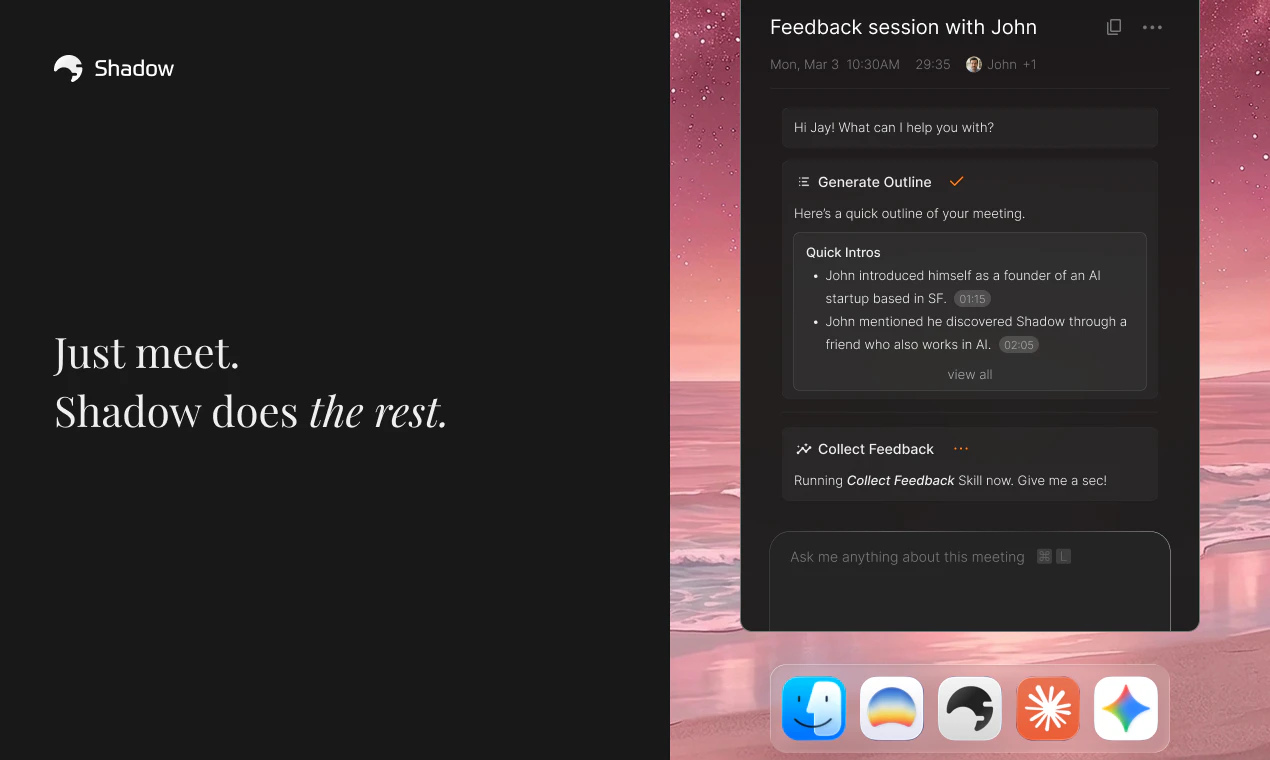
The shadow mac ai assistant operates as a native Mac application that bridges screen content and voice input into actionable automation. Unlike traditional chatbots that require manual input, Shadow monitors the user’s screen in real time and processes voice commands through built-in microphones. When triggered via keyboard shortcut or during a meeting, Shadow executes Skills—custom prompts that define what data to capture, how to process it, and what output to generate.
Small business owners on Mac gain three immediate benefits: hands-free control through voice, context-aware automation that understands what’s on screen, and no manual copying or pasting required. The architecture prioritizes local processing where possible, meaning sensitive data stays on the device rather than being routed through external servers.

Key Features
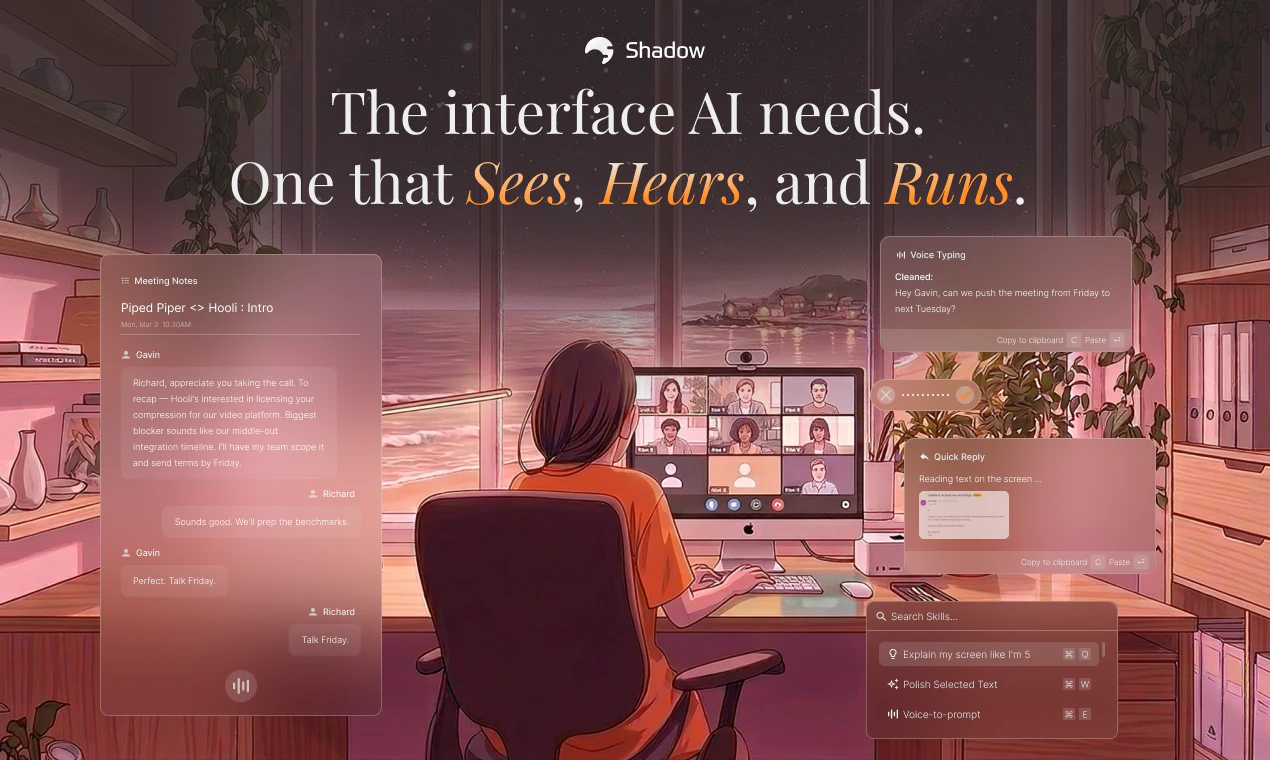
Quick Reply is designed for email workflows. When the user speaks while looking at an email thread or draft, Shadow analyzes both the voice input and the on-screen conversation context, then drafts a reply. This feature eliminates the gap between thinking through a response and writing it—the shadow mac ai assistant handles the composition while the user focuses on tone and content direction.
Voice Typing converts speech to text anywhere on the Mac. Whether drafting in a document editor, filling out a web form, or messaging a client, Voice Typing transcribes cleanly without requiring app-specific integration.
Meeting Skills automatically capture meeting transcripts and screenshots, then deliver formatted notes and action items. No bot appears in the meeting room—Shadow records locally on the user’s Mac during video calls. Small business owners avoid the awkwardness of inviting a third-party bot while still getting comprehensive meeting documentation.
Skills and Workflows Built-In
The power of the this solution lies in Skills, which are user-defined prompts that specify context and output. Shadow ships with three pre-built Skills (Quick Reply, Voice Typing, and Meeting Skills), but the framework is extensible. Small business owners can build custom Skills using a straightforward prompt editor—no coding required.
A small business owner managing customer support can create a Skill that summarizes incoming support emails and drafts responses. Another might build a Skill to extract invoice data from screenshots and populate accounting software. The it lets users combine screen capture, voice input, and custom instructions into reusable workflows triggered by a single keystroke.
Privacy and Local Processing
Shadow prioritizes on-device processing. Audio transcription happens on the user’s Mac rather than being sent to cloud servers, reducing latency and keeping sensitive conversations private. Screen data captured for Skills remains under user control; the platform does not send screen images to external services without explicit user action.
For small business owners handling confidential client information, this approach reduces regulatory friction and helps with data residency requirements. Apple’s macOS guidance reinforces this on-device approach as the recommended pattern for privacy-sensitive AI tools.
Pricing
Shadow offers free access to core features, with options for additional capabilities. Small business owners can test the the tool at no cost, then upgrade if custom Skills or advanced meeting features justify paid tiers. The free tier includes Quick Reply, Voice Typing, and basic Meeting Skills, making the entry barrier minimal for Mac users exploring voice automation.
Alternatives
Other Mac automation tools include Keyboard Maestro (scriptable workflows), Apple Shortcuts (native automation), and ChatGPT desktop integrations (manual prompting). Competing AI assistants focus on chat interfaces rather than screen-aware, voice-triggered automation. Shadow differentiates by combining all three—screen awareness, voice input, and custom automation—without requiring the user to open a separate app or chat window.
Pros and Cons
Pros: Operates without adding a bot to video calls, supports local audio processing, requires no coding to build custom Skills, and integrates seamlessly into existing Mac workflows. Users report saving meaningful hours each week on email drafting, meeting notes, and repetitive text entry.
Cons: Shadow is macOS-only, with no Windows or mobile companion apps. Speaker attribution in meetings can occasionally misidentify who spoke. The skill-building interface, while intuitive, still requires users to think through prompt structure and output design.
The Verdict
For small business owners on Mac, the the platform represents a meaningful step toward voice-first, screen-aware automation. Rather than toggling between apps, copying text manually, or waiting for meeting minutes to be summarized, Shadow consolidates these tasks into a single platform triggered by voice and keyboard shortcuts. With 202 Product Hunt votes and strong early retention, the platform is establishing itself as the native Mac alternative to chat-based AI assistants. The combination of free access, local processing, and extensible Skills makes Shadow worth testing for any Mac user managing email, meetings, or repetitive documentation tasks.
Check out Shadow on Product Hunt or visit the official Shadow website to learn more.