

Slideshot is an AI-powered demo video tool that completely automates screen recording and editing. Creating a product demo video has never been glamorous work. A founder or marketer sits down, opens a screen recorder, fumbles through the flow, re-records three times, then spends another hour in a video editor adding zooms, trimming dead air, and rendering the final file. Estimates from teams who do this regularly put the total time at two to four hours per video — and that is before localization or updating the demo when the product changes.
Slideshot launched on Product Hunt on May 21, 2026, ranked #6 Product of the Day, and collected 199 upvotes and 35 comments by pitching a direct answer to that problem: hand the entire recording and editing job to an AI agent.
Topics: Productivity, Developer Tools, Marketing Automation
What Slideshot Does
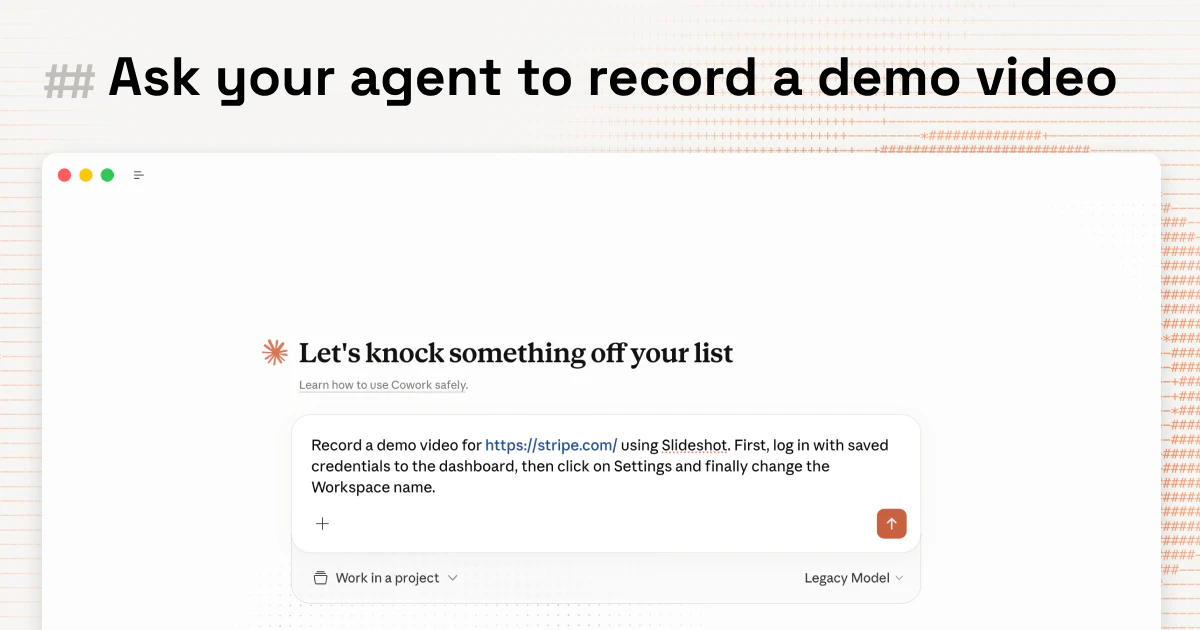
Slideshot accepts a product flow as input — a sequence of steps describing how a user moves through a web application — and then executes that flow autonomously inside a real browser. As the agent navigates, Slideshot records the screen and captures every click, scroll, and form interaction. When the session ends, it returns a polished demo video and an animated GIF, complete with programmatic zooms on key moments, smooth cursor motion, and a custom intro animation.
No manual recording. No post-production editing. The artifact is ready to drop into a landing page, a sales email, or a help center article.
This matters because demo videos decay. Every time a UI changes, the old recording looks wrong. Teams that rely on manual workflows either let stale recordings live indefinitely or pay the two-to-four-hour tax to re-record. Slideshot’s agent-driven approach means re-running a flow is a one-click operation rather than a half-day project.
The MCP Architecture: The Real Technical Differentiator
Most automated screenshot and screen-recording tools work by injecting JavaScript into a page or controlling a headless browser through a proprietary API. Slideshot takes a different approach: it operates over the Model Context Protocol (MCP), the open standard that lets AI agents communicate with external tools and environments in a structured, auditable way.
MCP is significant here for two reasons. First, it means the agent interacting with the browser is the same class of agent that can be composed with other MCP-compatible tools — scheduling systems, CRM data sources, content pipelines. A team could, in principle, wire Slideshot into a broader automation that detects a product release, pulls the relevant changelog, generates a demo flow, records it with Slideshot, and publishes the resulting video to a marketing channel, all without human intervention.
Second, MCP provides a layer of transparency that proprietary headless approaches lack. The commands the agent sends and the responses it receives are structured messages, not opaque browser automation scripts. For developer teams that care about auditability and composability, this is a meaningful architectural choice rather than a marketing detail.
Key Features
- AI agent-driven recording: The agent navigates a live browser session rather than replaying a static script, which means it handles dynamic UI states more gracefully than replay-based tools.
- Automatic post-production: Zooms, cursor smoothing, and intro animations are applied programmatically based on the recorded interaction data.
- GIF export: Every recording produces both a video file and an animated GIF, which covers the most common embed contexts — emails, GitHub READMEs, Notion docs, social posts.
- MCP integration: The browser automation layer speaks MCP, making Slideshot composable within larger agentic workflows built on tools like Automated Sales Machine and similar automation platforms.
- No manual editing: The output is delivered as a finished artifact, not raw footage requiring further processing.
Pricing
Slideshot’s pricing details were not fully enumerated in the Product Hunt listing at the time of this review. The product is live at slideshot.ai, where current plan and pricing information is available. Given the positioning — automated demo video production for developer and marketing teams — it is reasonable to expect a usage-based or seat-based subscription pricing model.
How It Compares to Alternatives
Loom is the default comparison, but Loom is fundamentally a human-in-the-loop tool. Someone still has to perform the recording. Loom’s AI features help with transcription and summaries, but they do not eliminate the recording step. Slideshot does.
Arcade and Supademo generate interactive product tours from screenshots rather than video recordings. They serve a different use case — embedded click-through demos — and do not produce video or GIF output suitable for asynchronous viewing in email or social contexts.
Guidde is the closest structural competitor: it automates the creation of how-to videos from browser recordings. The key difference is that Guidde relies on a browser extension and human-initiated recording, whereas Slideshot’s agent initiates and completes the session autonomously. For teams that want zero human involvement in the recording loop, that distinction is decisive.
Who Should Use Slideshot
Slideshot fits best in three scenarios. Developer-led teams shipping fast who need updated demo assets every sprint cycle but cannot justify a dedicated video producer. Marketing teams running product-led growth campaigns where fresh, accurate demo videos are a conversion lever. And founders at early-stage companies who are personally absorbing every function — recording a four-minute demo walk-through is exactly the kind of task that should not require four hours of a founder’s time.
Pros and Cons
- Pro: Eliminates the recording and editing bottleneck entirely for standard product flows.
- Pro: MCP architecture makes it composable within agentic automation pipelines.
- Pro: Dual output (video and GIF) covers the majority of real-world embed contexts.
- Pro: Re-recording after UI changes is low-friction by design.
- Con: Highly dynamic or authenticated-only flows may require additional configuration to run reliably.
- Con: Pricing transparency is limited at launch, making cost-benefit evaluation harder without a direct inquiry.
- Con: Teams needing interactive click-through demos rather than linear videos will need a complementary tool.
Verdict
Slideshot is a well-targeted product solving a real and recurring pain point. The MCP architecture is not window dressing — it reflects a genuine design philosophy about how AI agents should interact with software environments, and it gives Slideshot a composability advantage that replay-based competitors lack. The two-to-four-hour manual demo video workflow is a legitimate drag on lean teams, and Slideshot’s promise to collapse that to a single agent invocation is credible given the technical approach. Teams that produce demo content regularly should evaluate it directly.