


The best lead capture tools for small businesses in 2026 collect visitor contact information and route it directly into a follow-up system — without requiring three separate subscriptions and a Zapier account to make them talk to each other. Whether you need popup forms, landing pages, or full CRM automation, the right tool depends on how many gaps you can afford to leave in your lead pipeline.
Try ASM free for 14 days — forms, CRM, and follow-up automation in one workspace →
What Are Lead Capture Tools — and Why Do Most SMBs Get Them Wrong?
Lead capture tools collect visitor contact information and store it somewhere you can act on it. That last part — “somewhere you can act on it” — is where I see most small businesses go sideways.
The pattern I encounter with clients is almost always the same: a form builder, a separate email tool, a free CRM layer, maybe a landing page builder. Every tool costs $20–50/month. None of them talk to each other without a duct-tape integration. Real leads fall through the cracks between them every day.
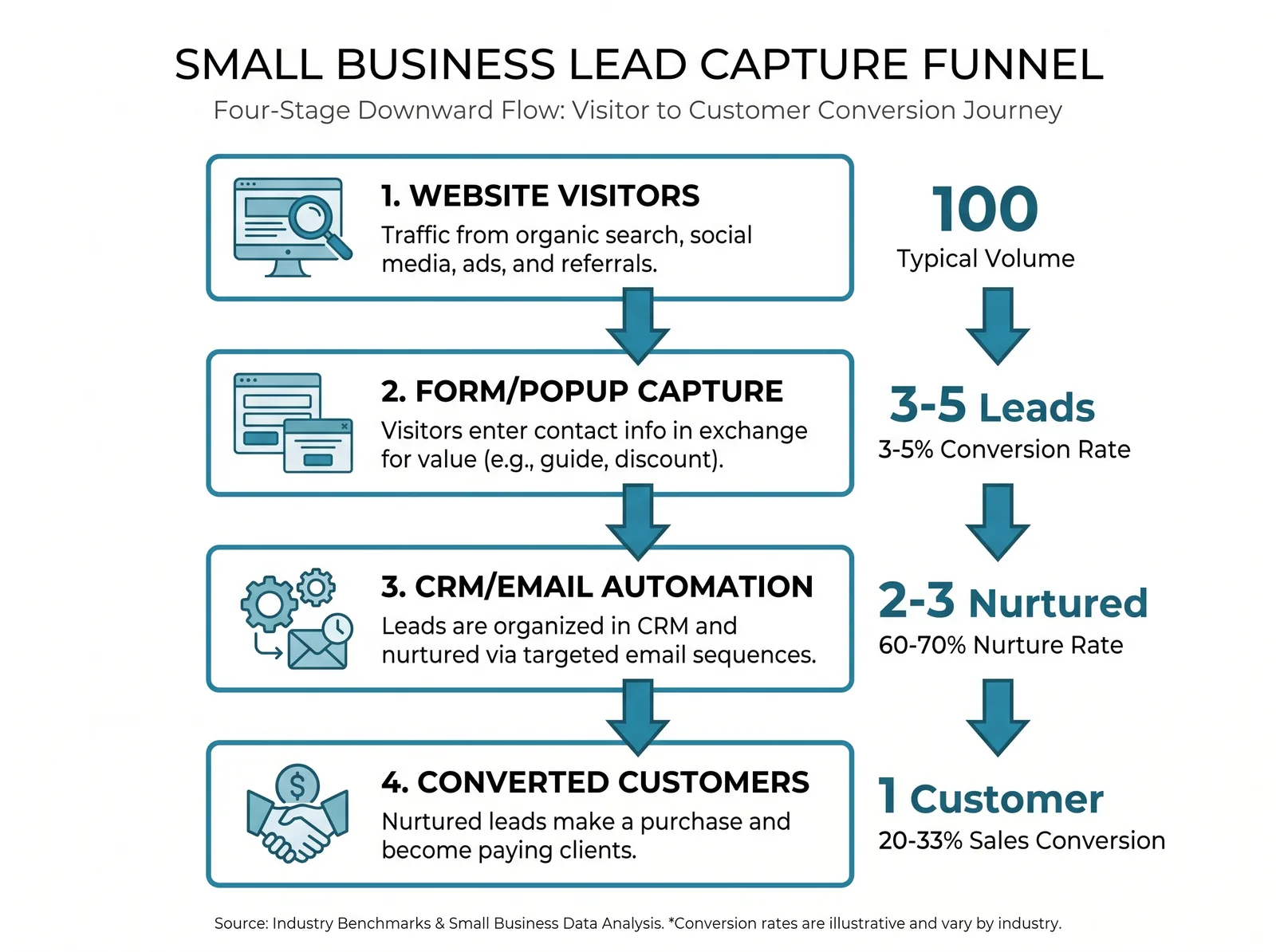
The core problem isn’t which form tool you pick. It’s whether your form, CRM, and follow-up automation live in the same system. When they don’t, every new lead is a manual data-entry task waiting to go wrong. According to the 2025 BrightLocal SMB Marketing Report, small businesses spend 5+ hours per month managing data between disconnected tools — time you’re not spending on actual sales conversations.
The Real Cost of Stitching Together Disconnected Tools
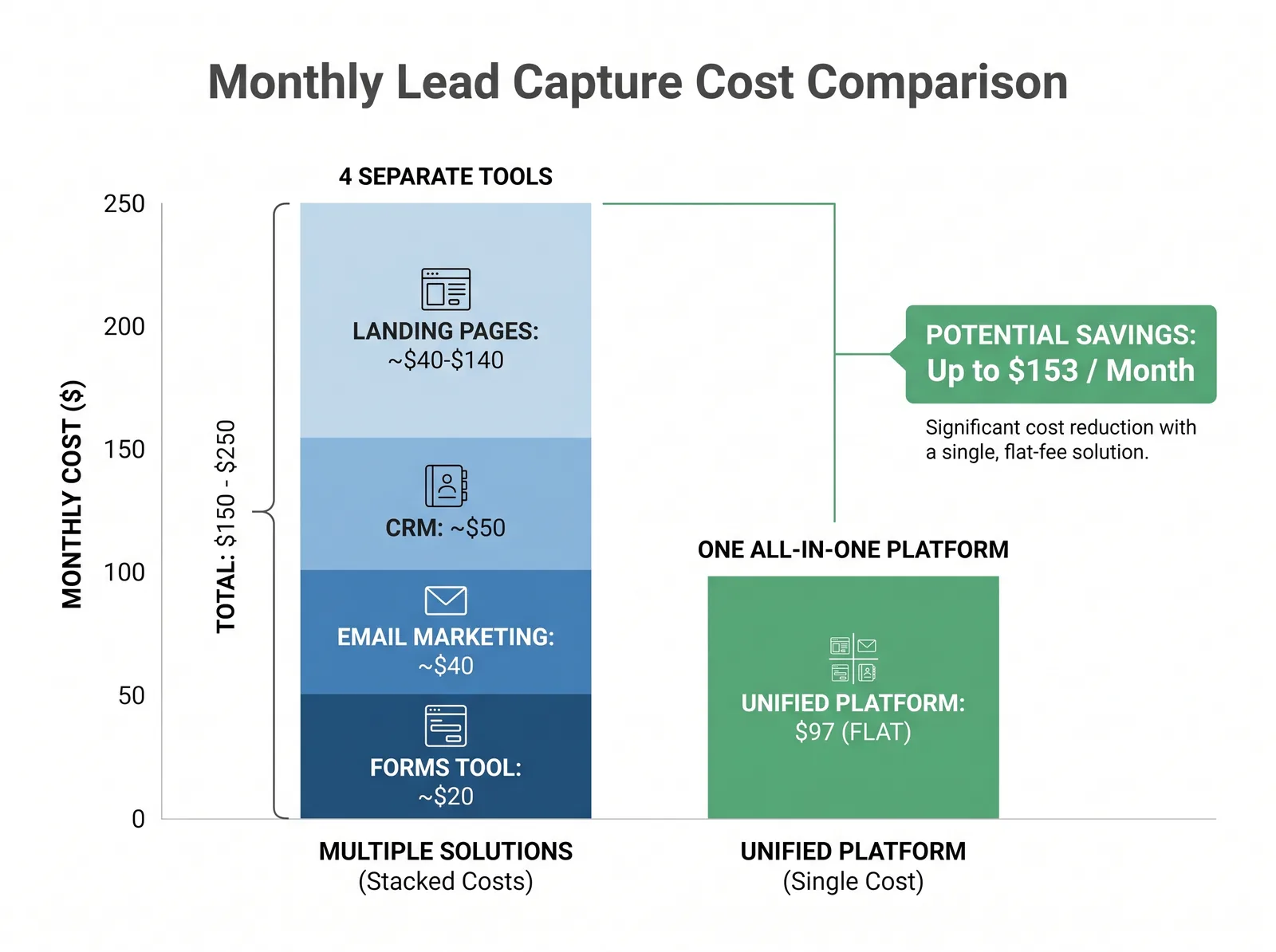
Here’s the exercise I walk every client through. Add up the actual monthly cost of your lead capture stack:
- Form/popup tool (OptinMonster Pro or Typeform Plus): $19–$50/month
- Email platform (Mailchimp Essentials): $13–$20/month
- CRM Starter (HubSpot, 1,000 contacts): $20/month
- Landing pages (Leadpages): $49–$99/month
- Zapier to connect them: $29/month
That adds up to $130–$220/month for a stack that still requires manual work every time a lead comes in. A 2024 Marketeze analysis found the average SMB marketing stack costs $342/month before time costs. A single all-in-one platform covering all of these functions typically runs significantly less.
“The real cost of disconnected lead capture tools isn’t the subscriptions — it’s the leads that go cold while you’re copying data between platforms.”
How I Evaluate Lead Capture Tools for Small Businesses
When I’m recommending lead capture software, I’m evaluating the whole system — not just the form builder. The six questions I ask: Is it truly no-code? Where does the lead go after opting in? Can follow-up trigger from the same platform? What’s the cost at 5,000 contacts (not just 500)? Is A/B testing available at an accessible price tier?
And can a first-time user get a workflow live in under an hour? A tool that scores well on all six doesn’t need five other tools to back it up.
The 6 Best Lead Capture Tools for Small Businesses in 2026
1. Automated Sales Machine — Best All-in-One Lead Capture Platform
Best for: Small businesses that want forms, CRM, email, SMS, and automation in one workspace without a patchwork of integrations.
Automated Sales Machine handles the entire lead capture cycle inside a single platform. You build your forms and landing pages with a drag-and-drop builder, connect them to a built-in CRM pipeline, and automate follow-up via email or SMS — all without leaving the platform. There’s no Zapier dependency because the system is already integrated end-to-end.
Where ASM stands out is in what happens after the lead opts in. A new form submission can automatically add a contact to a pipeline stage, fire a welcome email, send a follow-up SMS, and schedule a task for your sales team — in sequence, on a timer, without any manual work. That’s the workflow most small businesses are trying to build with 4–5 separate tools.
Pricing: Flat monthly rate that covers all features at all contact levels — no per-contact pricing spikes as your list grows.
2. OptinMonster — Best for Popup and Exit-Intent Targeting
Best for: Businesses that need aggressive popup and behavioral targeting on an existing website, and already have a CRM elsewhere.
OptinMonster is the specialist’s choice for on-site lead capture. Their exit-intent technology — which triggers a popup when a visitor is about to leave your page — is among the best in the market. Their library of 700+ templates and targeting rules (device type, page URL, visitor behavior) gives you granular control over when and where opt-in forms appear.
The limitation is that OptinMonster is a front-end capture tool only. It doesn’t include email marketing, CRM, or follow-up automation. You’ll need to connect it to a separate platform for any of that.
Pricing starts at $7/month (promotional rate) for the Basic plan with 2,500 monthly impressions, scaling to $49/month for Growth with 100,000 impressions across 5 websites. The “promotional” rates are a first-year discount — factor in the regular price when comparing.
3. Typeform — Best for Interactive Conversational Forms
Best for: Businesses where form design matters, especially for high-touch qualification or customer research.
Typeform’s one-question-at-a-time format delivers higher completion rates than traditional multi-field forms. The Basic plan starts at $28/month (billed annually) with 100 responses/month; Business is $91/month (annual) for 10,000 responses. It’s a very good form builder, but it doesn’t include CRM, email automation, or landing pages — and response limits on lower tiers can surprise you during a busy campaign month.
4. HubSpot Forms (Marketing Hub) — Best for Teams Already Using HubSpot
Best for: Mid-size businesses already invested in HubSpot’s CRM who want native form and automation integration.
HubSpot Forms connect natively to HubSpot’s CRM — which is the main reason to choose them. The free tier includes basic forms. Real automation requires Marketing Hub Starter ($20/month for 1,000 contacts), but serious workflows jump to the Professional tier at approximately $890/month — a price point that prices out most small businesses.
5. Leadpages — Best for Dedicated Landing Page Campaigns
Best for: Businesses running paid traffic campaigns that need fast, optimized landing pages with A/B testing.
Leadpages does one thing well: high-converting landing pages. The Grow plan starts at $49/month for the first 3 months (then $99/month regular). The Optimize plan adds Smart Traffic AI testing — $99/month promotional for the first 3 months, then $199/month regular. Like OptinMonster, it’s a front-end tool — you still need CRM and email connected via integration.
6. Unbounce — Strong Landing Pages, Scrutinize the Pricing
Best for: High-traffic campaigns needing serious landing page testing — but read the contract carefully.
Unbounce has capable landing page tools, but the platform has well-documented pricing controversy: user reports cite increases of 415% for some plans, plus overage penalties. Verify current pricing directly before committing to an annual contract.
Feature Comparison: What You Actually Get
Not all lead capture tools are built the same. Here’s how the top options stack up on the features that matter most for small businesses:
| Feature | ASM | OptinMonster | Typeform | HubSpot | Leadpages |
|---|---|---|---|---|---|
| Form/popup builder | ✅ | ✅ | ✅ | ✅ | ✅ |
| Landing page builder | ✅ | ❌ | ❌ | ✅ (paid) | ✅ |
| Built-in CRM | ✅ | ❌ | ❌ | ✅ | ❌ |
| Email automation | ✅ | ❌ | ❌ | ✅ (paid) | ❌ |
| SMS follow-up | ✅ | ❌ | ❌ | ❌ | ❌ |
| A/B testing | ✅ | ✅ (Plus+) | ❌ | ✅ (Pro+) | ✅ |
| No Zapier required | ✅ | ❌ | ❌ | ✅ | ❌ |
| Exit-intent popups | ✅ | ✅ | ❌ | ❌ | ❌ |
Pricing Comparison: The Full Stack Cost
Most tool comparisons show you the sticker price. What they don’t show you is what you’ll actually pay to get a complete lead capture system running. Here’s the honest comparison:
| Tool | Entry Price | What’s Missing | True All-In Cost |
|---|---|---|---|
| ASM | Flat monthly rate | Nothing — it’s all included | Flat rate |
| OptinMonster Pro | $29/mo (promo) | CRM, email, landing pages, SMS | $130–220/mo (full stack) |
| Typeform Plus | $56/mo (annual) | CRM, email, landing pages, SMS | $150–230/mo (full stack) |
| HubSpot Starter | $20/mo (1K contacts) | SMS, landing pages, serious automation | $70–150/mo (full stack) |
| Leadpages Grow | $49/mo → $99/mo | CRM, email, SMS | $150–230/mo (full stack) |
Stack costs based on adding Mailchimp Essentials ($13–20/mo), HubSpot CRM Starter ($20/mo), and Zapier Starter ($29/mo) to fill the gaps each tool leaves. Actual costs vary by contact count and feature tier.
Ready to replace the stack with one platform?
Try Automated Sales Machine free for 14 days — forms, CRM, email, SMS, and landing pages included, no credit card required.
Start free trial →
Watch the 4-minute demo →
All-in-One vs. Specialist Tools: How to Decide
I get this question constantly: “OptinMonster is better at popups — shouldn’t I use the best tool for each job?” Here’s the honest answer.
Specialist tools win when you have high traffic (50,000+ monthly visitors) and already run a fully operational CRM and email platform. OptinMonster’s exit-intent popups and Typeform’s conversational forms do outperform generic forms on raw conversion rate. But for most small businesses under 10,000 monthly visitors, the conversion rate difference is under 1%.
According to Thunderbit’s lead conversion benchmarks, landing pages convert at 2–5% regardless of the tool used. The biggest lever isn’t the form — it’s follow-up speed and quality after the opt-in. That’s where an integrated platform wins decisively.
For the full strategy — not just the tools — see How to Get More Leads for Your Small Business in 2026.
How to Set Up Your First Lead Capture Workflow in Under an Hour
Here’s the process I walk clients through when setting up from scratch — using an all-in-one platform. With separate tools, multiply each step by the number of platforms you need to configure.
- Build your form or landing page (15 min). Use a template. Change the headline, form fields (name + email + phone is usually enough), and CTA button text. Don’t overthink design — a live simple form beats a perfect one that isn’t built yet.
- Set up your CRM pipeline stage (5 min). Create a “New Leads” stage and map your form submission to automatically place contacts there.
- Configure your follow-up sequence (15 min). Minimum: an instant thank-you email and a follow-up 24 hours later. Add an SMS touchpoint if your audience expects it.
- Publish and test (5 min). Submit a real lead yourself — verify it appears in your CRM pipeline and triggers the email sequence correctly.
- Set a 30-day review (2 min). Check your opt-in rate after the first month. Conversion rates vary significantly by industry — establish your own baseline before comparing to averages.
Total: under 45 minutes. The follow-up sequence is where the real value lives — don’t skip it to get the form live faster.
Frequently Asked Questions
What is the best lead capture tool for small businesses in 2026?
The best lead capture tool for small businesses is one that connects forms directly to CRM and automated follow-up without separate integrations. For most SMBs, an all-in-one platform delivers more value than combining specialist tools once you account for the full stack cost. Automated Sales Machine, HubSpot Starter, and Leadpages (paired with a CRM) are the strongest options depending on budget and current stack.
What’s the difference between a lead capture form and a landing page?
A lead capture form is the actual form element — the fields where a visitor enters their contact information. A landing page is the full page containing that form, with headline, copy, and a single call to action.
Forms can be embedded anywhere. Landing pages are standalone pages designed to convert a single traffic source, like a paid ad. Most all-in-one platforms include both.
How do I connect my lead capture form to my CRM?
If your form tool and CRM are the same platform, form submissions automatically create CRM contacts — no configuration needed. If they’re separate tools, you’ll use a native integration or a Zapier automation to pass form data to your CRM. Native integrations are faster and more reliable. If you’re paying $29/month on Zapier just to connect your form to your CRM, that’s a clear signal to consolidate platforms.
How much should a small business spend on lead capture tools?
A complete lead capture system — forms, landing pages, email automation, and basic CRM — should cost $50–150/month. If you’re spending over $200/month on this category, audit for overlap. Many businesses pay for tools that duplicate each other’s functionality. The goal is to ensure every dollar moves a lead toward a purchase, not to add more platforms.
Can I use free lead capture tools for my small business?
Yes, with real limitations. Google Forms and HubSpot’s free CRM tier work for businesses receiving fewer than 100 leads per month who can handle follow-up manually. Once you’re generating 20–30 leads per week, the time cost of manual follow-up typically exceeds the monthly cost of a paid platform that automates it.
What’s the best way to increase form conversion rates?
Three changes that consistently move the needle: reduce form fields to the minimum required, match your form headline to the exact ad or content that drove the visit, and add social proof near the form. Together, these typically improve conversion rates from 2–3% to 4–6% without changing traffic source or spend.
How long does it take to set up a lead capture workflow?
With an all-in-one platform: under an hour for a first-time setup including form, CRM pipeline, and a 2-email follow-up sequence. With separate tools connected via Zapier: expect 4–6 hours initially plus ongoing maintenance every time a platform updates its API. That time cost compounds significantly across a year of running campaigns.
Key Takeaways
- The best lead capture tool is one where leads flow from form → CRM → automated follow-up without manual steps
- Specialist tools (OptinMonster, Typeform) outperform generic forms at the top of funnel — but require additional tools to handle what happens next
- The average full lead capture stack costs $130–220/month when you add up all the tools; an all-in-one platform typically runs less
- Average landing page conversion rates run 2–5% — the biggest variable is follow-up speed and quality, not the form tool itself
- A functional lead capture workflow can be live in under an hour; don’t let tool selection delay execution
- Always run the cost math at scale (5,000+ contacts) — some platforms that look affordable at 500 contacts become expensive quickly
Replace Your Lead Capture Stack With One Platform
Automated Sales Machine combines forms, landing pages, CRM, email automation, and SMS follow-up in a single workspace. No Zapier, no manual data entry, no leads falling through the cracks between tools.
Start your 14-day free trial — no credit card required
See how it works in one short video